

Here is what you need to do to cancel your subscription, it's very easy...
Log in by clicking on the Login icon at the top right of the Quant Investing website.
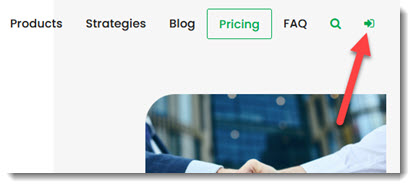
If you have forgotten your username click the link Forgot your password? below the Login button
After you have logged in:
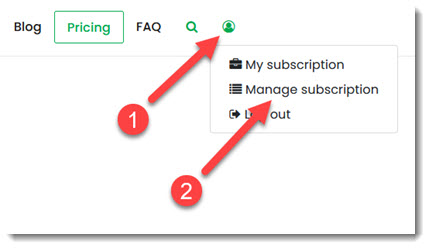
Step 1- Click the Subscriber Icon that appeared at the top right of the website.
Step 2 - Click on the Manage subscription menu item.
On the next page:
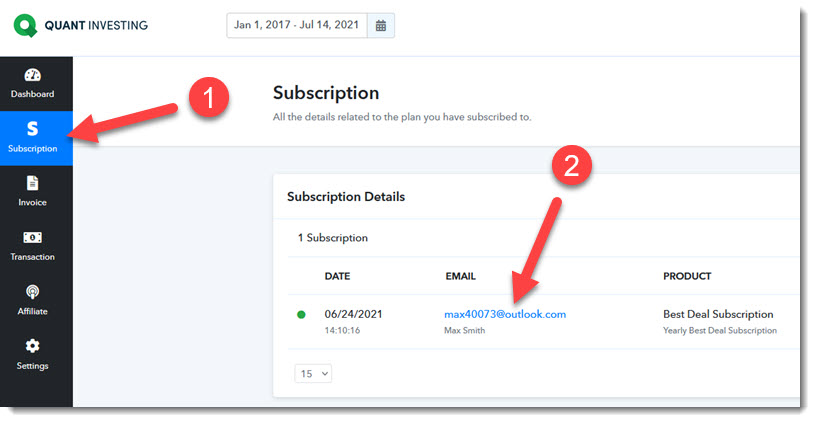
Step 1 - Click the Subscription left menu item.
Step 2 - Click on your email address to show your subscription details.
On the next page:
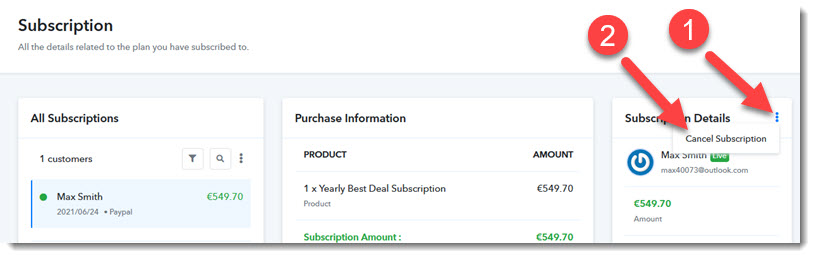
Step 1 - Click on the vertical three blue dots to open the menu.
Step 2 Click on the Cancel Subscription menu item.
That is all you must do.
You will receive an email to confirm that your subscription has been successfully cancelled.
Keywords: Delete account, cancel subscription, unsubscribe, delete subscription, unsubscription, termination